Google Business Profile for a Dental Practice: The Setup Checklist
A dental practice’s Google Business Profile is its free listing on Google. It decides whether you show up on Google Maps and in the map results under a search. It also helps a patient decide whether to trust you. A listing set up once in a hurry and left alone falls behind the ones kept current. This checklist covers every part of your listing in the order a patient sees it. Each step names a common mistake, so you can check your own listing in one sitting.
Who should own the Google Business Profile?
Before anything else, check who controls the listing. It should be owned by a Google account the practice controls, using a practice email address. It should not be a former office manager’s personal Gmail or an agency’s account. Agencies and staff can be added as managers, and removed when they leave. The person with the owner role controls the listing.
If the listing is not verified yet, do that first. Google often asks dental practices to verify with a short video showing the signage, the office and proof you manage the business. Our guide on Google Business Profile verification covers the methods.
Which category should a dental practice choose?
The primary category is one of the things Google weighs most on your listing. It decides which searches you can appear for at all.
- Set the primary to “Dentist” for a general practice. Specialists should lead with their specialty: “Orthodontist”, “Endodontist”, “Periodontist”, “Oral surgeon”, “Pediatric dentist”, “Prosthodontist”.
- Add secondary categories only for what the practice really does: “Cosmetic dentist”, “Emergency dental service”, “Dental implants provider”, “Pediatric dentist”.
- Remove anything that describes work you do not offer.
Common mistake: a primary category picked in a hurry years ago, or a long list of secondary categories that do not match the services.
What should the practice name be?
- Exactly what is on your sign, your website and your paperwork.
- No city, no “best”, no treatment added on.
Common mistake: “Best Dentist Phoenix | Smile Dental Implants & Invisalign”. Names like this are a common reason listings get suspended, and a suspended listing does not show up at all.
How should the address and service area be set?
- The address exactly as it appears on your website and in directories, including the suite number.
- Pin on the right building. In a medical office park or a strip center, check that the pin sits on your entrance, not the parking lot or the building next door.
- Leave the service area blank. Patients come to you, so the address is what matters.
Common mistake: a suite number missing on Google but present everywhere else, or a pin on the wrong building. Both can hold the listing back in the map results.
What goes in the phone, website and booking fields?
- Phone: the number the front desk answers. If you use call tracking, make the tracking number the primary number. Keep the main office number as an additional number, so your listings stay consistent.
- Website: a link to your homepage or your location page. Add tracking tags (a short code at the end of the link) so Google Analytics can tell visits from your listing apart from other Google visits.
- Appointment link: your online booking page, if you have one. Patients can tap it straight from the listing.
Common mistake: an untagged homepage link, so nobody can see how many patients the listing actually sends.
How should hours be set?
- Real hours for each day, including the late evening or the Saturday you are open.
- A lunch closure only if the phones are truly unanswered.
- Holiday hours set ahead of time: Thanksgiving, Christmas, New Year’s Day, July 4 and any days the practice closes.
Common mistake: hours unchanged since the listing was created, and a one-star review from someone who drove to a locked door.
How should services and treatments be listed?
- Every treatment, under the matching category, with a short plain description: cleanings and exams, fillings, crowns, root canals, extractions, implants, clear aligners, veneers, whitening, emergency visits, children’s dentistry.
- Write descriptions the way patients ask: “Same-day emergency visits for tooth pain or a broken tooth.”
- Group them the way a patient thinks: urgent care, everyday care, cosmetic, replacing teeth.
This is what helps the listing show up for “emergency dentist near me” or “dental implants near me”, and not only “dentist near me”.
Common mistake: three services added on day one, or none at all.
What about insurance, accessibility and other attributes?
Patients filter on these details. Fill in everything Google offers for your listing:
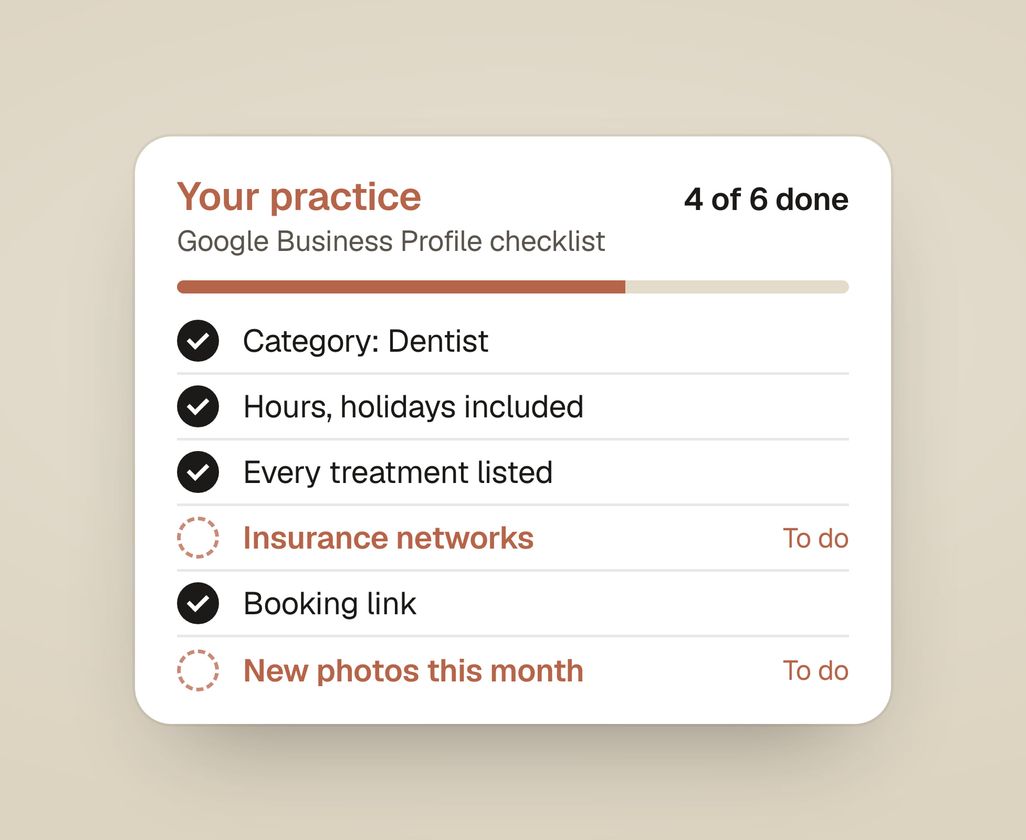
- Insurance. Where Google shows a health insurance section, list the networks you are in. Patients with a PPO plan often filter out practices that do not show theirs.
- New patients. If the option to show you are accepting new patients is available, use it.
- Accessibility. Wheelchair-accessible entrance, parking and restroom, if they apply.
- Languages spoken, if your team speaks Spanish or another language.
- Identity attributes, such as veteran-led or women-owned, only if they are true and you want them shown.
What photos should a dental practice add?
- The building from the street, so patients recognize it when they arrive.
- The entrance, parking, reception, an operatory, the sterilization area, the team and each dentist.
- A few new photos every month.
- No stock photos of teeth or smiles.
- Before-and-after photos only with written patient consent, and only within your state dental board’s advertising rules.
Common mistake: a logo, an exterior photo from 2019 and two stock images.
What should the description say now that Q&A is gone?
Google retired the Questions and Answers section on Business Profiles starting in late 2025. In its place, patients can ask about a place and get an AI-written answer built from your listing, your reviews and your website. So the answers patients need have to live in those places:
- Description: who runs the practice, what you treat, where you are, and what patients can expect, in plain words. Mention insurance, emergencies and children if they apply. No keyword lists.
- Services: the descriptions above do a lot of this work.
- Website: clear pages for insurance and payment, new patients, emergencies, and each treatment. AI answers draw on your site, so the facts need to be there and match the listing. Our guide to showing up in Google AI and ChatGPT searches has the checks.
How should a dental practice handle Google reviews?
- Get your review link from the listing’s “Ask for reviews” option. Our guide on how to get a Google review link shows where it lives.
- Ask every patient the same way, at checkout and in a text the same day. Scripts are in our guide on how to ask patients for Google reviews.
- Reply to every review within a few days, without confirming the reviewer is a patient or mentioning any treatment. HIPAA applies to review replies. Federal regulators have fined dental practices over replies that shared patient details.
- Never buy reviews, offer anything for them, or ask only happy patients. Google forbids it, and the FTC’s rule on fake reviews has applied since October 2024.
Common mistake: 60 reviews, none answered, the most recent from four months ago.
How do you check for suggested edits and duplicate listings?
- Anyone can suggest an edit to your listing, and Google applies some without asking. Check monthly for changed hours, phone numbers, categories or website links.
- Search your practice name and address on Google Maps for duplicates: an old listing from a previous address, or listings for dentists who have left. Duplicates split your reviews. Ask Google to merge them or mark them as moved.
Common mistake: the listing of a dentist who left three years ago, still collecting calls.
What is the monthly routine?
Fifteen minutes a month:
- Add three to five new photos.
- Post a short update if anything changed: hours, a new dentist, a new treatment.
- Reply to every new review.
- Check for suggested edits and duplicates.
- Look at the performance numbers: searches, calls, direction requests, website clicks and bookings.
Listings that stay current tend to hold their place in the map results better than listings left alone.
How does Studio Smirk handle Google Business Profiles?
We do every part of this checklist on your listing, in your practice’s own Google account. Then we keep it up to date every month. The full details are on our Google Business Profile service page. It is part of every plan on our pricing page. See also how we work with dentists and cosmetic and implant practices. You can also do every step above in-house in an afternoon.
Our practice audit compares your Google listing with the top three practices near you on Google. It shows what they filled in that you did not, and what to fix first. Get my practice audit.