How to Ask Patients for Google Reviews: Scripts for the Front Desk
A patient who had a good visit will often leave a Google review when asked the right way. The ask fails when it is a card at the desk that ends up in a cup holder, a text with no link, or an email a week later. This guide gives the exact words to use in the chair, at the checkout desk, in a same-day text and in one follow-up. It also covers who to ask, what never to say, the US rules, and how to reply without breaking HIPAA.
What do you need before you start asking?
None of this works without a link that opens the review form in one tap. Get it from your Google Business Profile with the “Ask for reviews” option. Our guide on how to get a Google review link shows exactly where. Then:
- Save the link as a text template in whatever system your front desk uses to text patients.
- Print it as a QR code on a small card at checkout.
- Add it to the post-visit email or text, if your patient communication software sends one.
Check one thing first: only text patients who have agreed to receive texts from your practice. Ask for that consent on your intake form. If your form does not ask yet, add it.
What should the dentist say in the chair?
Right at the end, while the patient is still in the chair. One line, then move on.
“That went really well. If you have a minute later, it helps us a lot when patients share how their visit went on Google. [Front desk name] will text you the link.”
For a nervous patient who just said it was easier than expected:
“You said that was easier than you expected. That’s exactly what the next nervous patient needs to hear. Would you mind saying so on Google? We’ll text you the link.”
The dentist does not hand over a phone or wait while the patient writes. The job is to mention it and say who sends the link.
What should the front desk say at checkout?
While the patient is paying or booking the next visit, with the QR card on the counter:
“Dr. [Name] mentioned the review. I’ll text you the link now so you don’t have to look for it. Whenever you get a minute is perfect.”
Then send it before the patient leaves. If they are in a hurry:
“Or scan this. It opens right to the review.”
What should the same-day text say?
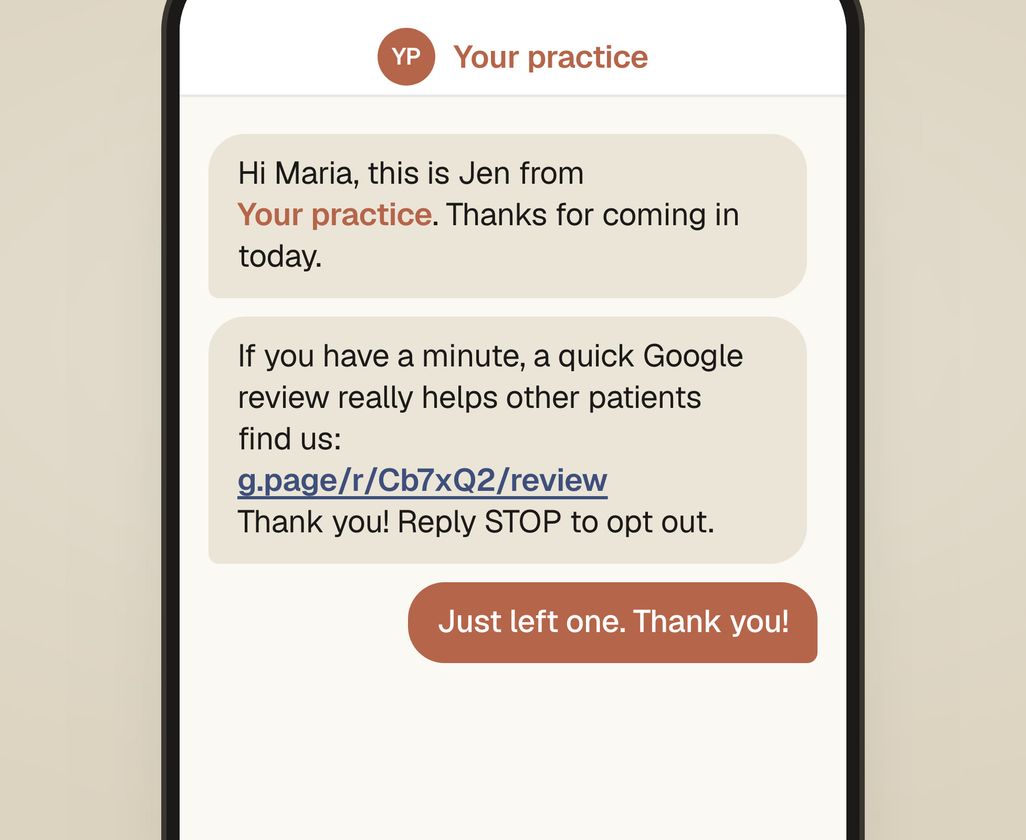
This is the message that carries the link. Keep it short and friendly, with the link on its own line, and no details about the patient’s treatment.
Hi [First name], this is [Name] from [Practice]. Thanks for coming in today.
If you have a minute, a quick Google review really helps other patients find us:
[link]
Thank you! Reply STOP to opt out.
Three rules for this message:
- Keep treatment out of it. “Hope the tooth is feeling better” sounds kind, but a text can be read by anyone holding the phone. Mentioning care in a text is a privacy risk you do not need.
- The link on its own line, so it is easy to tap.
- Send it the same day. Tomorrow the feeling has faded.
Include an opt-out line if your texting platform does not add one automatically.
What should the one follow-up say?
If no review arrives within about five days, send one more message, then stop.
Hi [First name], [Name] from [Practice] again. No pressure at all, but here’s the review link in case it got buried: [link]
Never a third message. If a patient has not left a review after two messages, they do not want to. A third message can cost you a referral.
What if a patient offers to leave a review?
Patient: “You were so gentle. I’m going to tell everyone about you.”
“That’s so kind. The most helpful place is Google, because that’s where people look for a dentist. I’ll text you the link right now.”
And send it right then, while they are still in the room.
Who should you ask?
Everyone, the same way. Asking only the patients you expect to be happy is called review gating. Google’s policy forbids it, and the FTC has said it can be deceptive. It also leaves you with many identical five-star reviews that patients do not believe. A 4.8 with thoughtful replies often reads as more believable than a perfect 5.0.
Visits that tend to lead to a review:
- An emergency patient whose pain is gone.
- A nervous patient who was surprised it went smoothly.
- A parent after a child’s first visit.
- A cosmetic or clear aligner patient at the reveal.
- A routine cleaning. Fewer of these patients leave a review, but it is still worth asking.
What should you never say or do?
- “Give us five stars.” Ask for a review, not a rating.
- “Leave a review and get $20 off your next visit.” Google forbids incentives for reviews. The FTC’s Consumer Reviews and Testimonials Rule has been in force since October 2024. Under it, offering a reward on the condition that a review is positive (or negative) can bring civil penalties.
- “Mention Dr. [Name] and the implant.” Coaching what patients write makes reviews read as fake.
- Have staff, family or friends post reviews. The same FTC rule covers reviews by your staff or their family that do not say who wrote them.
- Ask for Yelp reviews. Yelp tells businesses not to ask. Its software filters out reviews it thinks were asked for.
- Ask on a bad day. If a visit went badly, the message is “please call me if anything isn’t right”, not a review link.
How do you reply to reviews without breaking HIPAA?
Patients read how a practice answers reviews before they decide to call. In the US, a dental practice’s reply is bound by HIPAA, and federal regulators have acted on it. The HHS Office for Civil Rights has settled with or penalized several dental practices over review replies. A Dallas practice paid $10,000 over its Yelp replies. A North Carolina practice got a $50,000 penalty after it answered a negative review with patient information.
As a rule, never confirm the reviewer is a patient, and never mention a visit, treatment, date, insurance or bill. That holds even if the reviewer posted those details themselves.
A good review:
“Thank you for taking the time to share this. The whole team will be glad to read it.”
A complaint:
“We take every concern seriously. Privacy rules prevent us from discussing anyone’s care online, but we’d like to talk. Please call our office manager, [Name], at (512) 555-0142.”
A review that looks fake, such as one from someone you have no record of: reply briefly and calmly, because other patients will read your reply. Then report it to Google. Our guide on how to remove a fake Google review covers what Google will and will not take down. Our guide on how to respond to Google reviews has the full HIPAA reply rules and more examples.
How do you keep reviews coming steadily?
The goal is a few reviews a week, every week. Three habits make that happen:
- A saved text template, so sending the link takes one tap.
- A note in the schedule of who was asked and who was sent the link. This is not to chase anyone. It is so nobody is asked twice.
- A number the owner checks monthly: reviews this month, reviews last month, and whether every one has a reply.
Fifty reviews in one weekend from a mass text looks bought. Google’s filters are built to catch that. Four a week for a year is around two hundred real reviews.
How does Studio Smirk handle reviews for practices?
We set this up as part of our work on your Google listing. That means the review link, the QR card at the desk, the text templates, and a reply to every review. Your monthly report shows how many reviews came in. The requests go out from your own patient texting software or by hand at the front desk. It comes with our Google Business Profile service, which is in every plan on our pricing page. See also how we work with dentists and cosmetic and implant practices. You can use the scripts above starting tomorrow morning.
Our practice audit compares your reviews with the top three practices near you on Google. It shows what to change first. Get my practice audit.