Google Local Services Ads for Dentists: Cost, Setup and Two Rules to Know
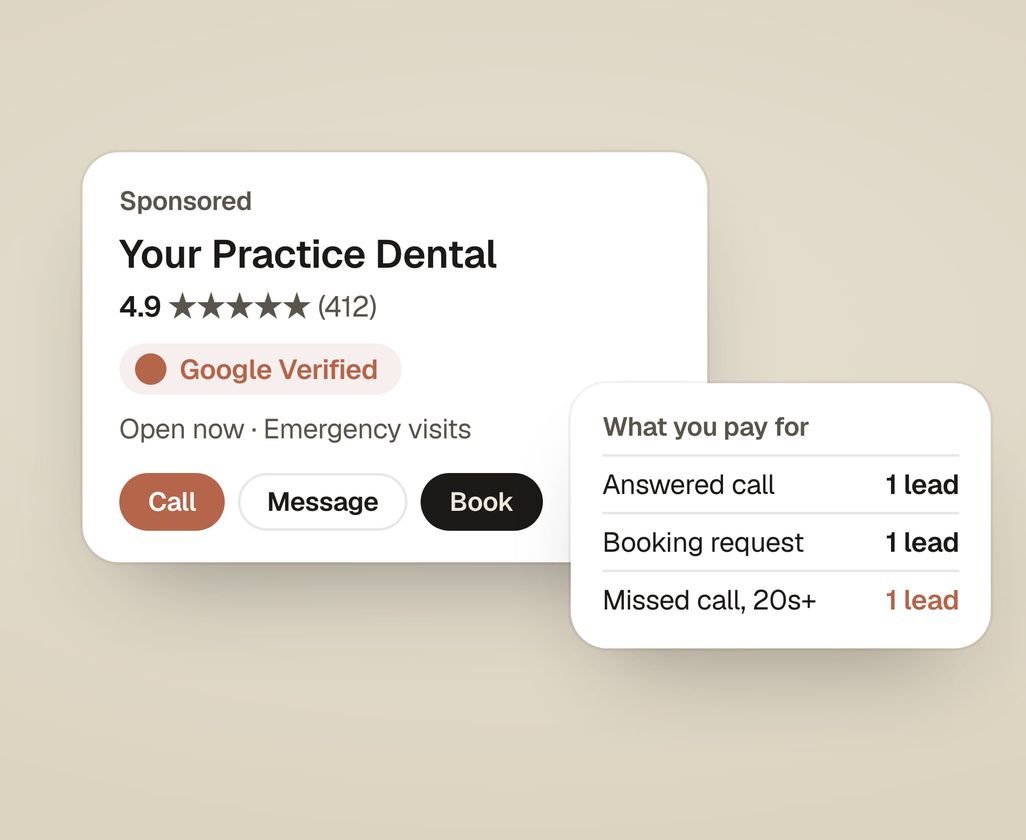
Google Local Services Ads are the ads at the very top of Google’s results that show a business name, its star rating and a “Google Verified” badge. A dental practice pays for each lead, meaning a call, a message or a booking request, not for each click. Before the ads can run, Google screens the practice: a background check, licenses and insurance.
Two rules work differently for US health care, and they change how you should run these ads. Google gives no credits for bad leads, and it does not record calls. This guide covers what you pay for, what a lead costs, how to get approved, and when regular Google Ads are the better choice.
What are Local Services Ads?
When someone searches “dentist near me” or “emergency dentist”, Local Services Ads can appear above everything else on the page, including regular Google Ads. Each one shows the practice name, rating, review count, hours and the badge. Tapping it opens a short profile with a call button, a message button and, where offered, a booking request.
They are run from a separate Local Services account, not from a normal Google Ads campaign. You choose the services you offer, the area you serve, your hours and a weekly budget. Google decides which searches your ad shows for. You don’t pick keywords.
One thing changed recently. Google used to attach a money-back promise, the “Google Guarantee”, to some badges. It ended that promise for services booked from 7 December 2025 and moved every advertiser to one “Google Verified” badge.
What does Google charge a dental practice for?
You pay per lead. Google’s help pages list what counts:
- A call you answer, or a callback where you speak with the person.
- A missed call during your business hours, if the caller stays on the line for more than 20 seconds.
- A text or email from the person.
- A voicemail left during business hours, if the caller stays on for more than 20 seconds.
- A booking request.
And what doesn’t count:
- Calls Google judges spam or invalid at first contact.
- Repeat contact from the same number or email within 15 days of a charged lead.
- Unanswered calls outside your business hours.
- Callers who hang up in a phone menu without pressing a key.
Read the second line of the first list again. A missed call at lunch can still cost you a lead.
Which two rules are different for dentists?
Google’s help pages carve out health care in the US in two places.
- No lead credits. Other businesses get some charged leads credited back if Google later finds them invalid or poor quality. Google says lead credits “aren’t available for health care verticals”. Once a dental lead is charged, it stays charged.
- No call recordings. Other businesses can listen back to their ad calls. US health care advertisers can’t.
Together these mean three things for a practice:
- Answer the phone. Every missed call over 20 seconds during business hours is money spent on nothing. If your front desk can’t pick up at lunch, set your ad hours to match when someone is there.
- Keep your hours exact. Google uses your listed hours to decide which unanswered calls it charges for.
- Log every lead yourself. With no recordings and no credits, your own log is the only way to see which leads were real. A column in your booking software or a shared sheet is enough: date, name, what they wanted, booked or not.
What does a lead cost?
Google doesn’t publish dental lead prices. Dental agencies that publish estimates put them at about $30 to $95 a lead in 2026. General dentistry sits at the low end, emergency and implant leads at the high end, and big metros cost more than suburbs. These come from agencies’ own accounts and aren’t audited, so use them only to set a first budget.
What you really want is the cost per new patient. If half of your leads book, double the lead price: a $60 lead becomes a $120 new patient. If one in three books, triple it. For comparison, our guide to what Google Ads cost for dentists works through the same sum for regular search ads.
Check your own numbers after 30 days. Your Local Services dashboard shows every charged lead. Match it against your own log.
What decides where your ad shows?
Google says the order is an auction. It weighs three things:
- Your bid, the most you are willing to pay for a lead. Google recommends letting it set bids automatically.
- How likely you are to get a lead, which includes how quickly you respond. Google says missed calls can count against you.
- Your profile quality: your rating, how many reviews you have, how fast you respond, and whether your profile has photos.
If you have several locations covering the same area, Google shows only one of them for a search.
Reviews matter here as much as on Google Maps. Our guide on how to ask patients for Google reviews has the scripts.
What does Google check before your ads run?
Google’s screening page lists a background check, business registration, the licenses your work needs, and general and professional liability insurance. For dental practices, agencies also report that Google checks the practice’s National Provider Identifier (NPI) and each listed dentist’s state license. The screening is free. Agencies report it taking two to five weeks, and longer when a document doesn’t match exactly.
Have these ready before you start: the practice’s legal name exactly as registered, each dentist’s license number, your NPI, and your insurance certificates.
Local Services Ads or regular Google Ads?
| Local Services Ads | Regular Google Ads | |
|---|---|---|
| You pay for | Each lead (call, message, booking) | Each click |
| Where the person lands | Your Local Services profile | A page you choose, like your implants page |
| Control | Services, area, hours, budget | Keywords, ads, pages, bids |
| Best for | General, family and emergency calls | High-value treatments with their own page (implants, Invisalign, veneers) |
| Bad leads | Charged, with no credits for health care | You pay for clicks, good or bad |
Many practices run both: Local Services Ads for everyday and emergency calls, and regular ads that send implant or Invisalign searches to a page built for that treatment. Our guide to Invisalign marketing for dentists covers what that page needs.
When are Local Services Ads not worth it?
- Your phones go to voicemail often. You’ll pay for leads you never speak to.
- You have few reviews compared with the practices around you. Your profile quality is part of the auction, and patients compare stars before they call.
- You want more of one high-value treatment. The ad opens your profile, not a page that answers questions about implants. Regular ads to a treatment page do that job better.
- Your schedule is already full. Spend on keeping patients instead.
How do you set them up?
- Sign up for Local Services Ads from Google’s site, signed in with a Google account in the practice’s name.
- Choose the services you offer and the ZIP codes or cities you serve.
- Enter your hours exactly as the front desk works them.
- Submit the screening documents: business registration, licenses, insurance and the background check consent.
- Link your Google Business Profile so your reviews show on the ad.
- Set a weekly budget and let Google set bids at first.
- Start a lead log on day one.
Where does Studio Smirk sit?
We set up and run Local Services Ads as part of our Google Ads service. The account is in your practice’s name, Google bills your card directly, and we add nothing to what Google charges. Our fee is published on our pricing page.
The practice audit shows how your reviews and rating compare with the three practices above you on Google, which is most of what Local Services Ads look at. Get my practice audit.